Typst Usage
Brief Introduction
If you are a user migrating from Manim, you may have some understanding of LaTeX.
When we use Typst in JAnim, it’s like using LaTeX in Manim. We can create typesetting or formulas through code.
We commonly use TypstText and TypstMath to use Typst in JAnim


typ1 = TypstText(R'This is a #text(aqua)[sentence] with a math expression $cos^2 x + sin^2 x = 1$')
typ2 = TypstMath(R'cos^2 theta + sin^2 theta = 1')
Tip
When you use the VS Code plugin janim-toolbox, Raw strings (in the form of R'...') appearing in TypstText will be highlighted as Typst code, as shown in the figure below

Unfortunately, Raw strings in TypstMath do not have this feature yet.
If you prefer to use JAnim to display formulas, you are more likely to use TypstMath frequently.
Types of Typst Items
Typst items are divided into three types:
TypstTextrepresents Typst text. The passed string will not be wrapped by$ $TypstMathrepresents Typst formulas. The passed string will be wrapped in$ $and compiled as a formulaTypstDocis the base class for all other Typst items. It represents a Typst documentTypstDocdiffers fromTypstTextandTypstMath. It automatically aligns with the top of the frame, giving a feeling of “viewing from the beginning of the document”

That is, the difference between TypstText and TypstMath is only whether they are wrapped in a formula environment. For example, TypstMath('x^2') and TypstText('$ x^2 $') are equivalent in most cases
Typst Sub-item Indexing
Basic Usage
For regular items, using Sub-item Selector is more convenient; for Typst items, there is a more convenient indexing method: character indexing
For example, for TypstMath objects
typ = TypstMath('cos^2 theta + sin^2 theta = 1')
You can use typ['cos'] to get the part corresponding to cos, so you can use methods like typ['cos'].set(color=BLUE) for coloring or other processing.
Handling Multiple Matches
You should have noticed there are two “θ” (theta) here. When you use typ['theta'] for indexing, it will take the first matching θ, which is the previous one.
Since they are numbered sequentially from 0, 1, …, in this example you can use typ['theta', 1] to get the latter one.
Note
This also means t['theta'] and t['theta', 0] are equivalent
TypstColorizeExample 
typ = TypstMath('cos^2 theta + sin^2 theta = 1', scale=3).show()

self.forward()
self.play(typ['cos'].anim.set(color=BLUE))
self.play(typ['sin'].anim.set(color=BLUE))
self.play(typ['theta', 0].anim.set(color=GOLD))
self.play(typ['theta', 1].anim.set(color=ORANGE))
self.forward()
self.play(typ['theta', ...].anim.set(color=GREEN))
self.play(typ['space^2', ...].anim.set(color=RED))
self.forward()
If you want to extract multiple at once, write multiple numbers in a sequence. For example, typ['theta', (0, 1)] extracts matches numbered 0 and 1, which here are all matched θ symbols.
You should have discovered that extracting items (0, 1) is actually extracting all items. For this case, JAnim provides typ['theta', ...] using ellipsis to represent extracting all matches.
Some Special Cases
When you want to extract
typ = TypstMath('cos^2 theta + sin^2 theta = 1')
the superscript “2” in it, using typ['2'] cannot match it, because the superscript “2” looks different from the regular “2”.
To match correctly, you need to represent the 2 in the index as a “superscript” form, for example typ['""^2'] or typ['space^2']. Both treat “2” as a superscript of an empty element ("" or space), so it can be matched correctly.
Important
The above examples using TypstMath for character indexing are almost the same for TypstDoc and TypstText, but there are slight differences
We know that among these three types of objects, only TypstMath is in a formula environment, so when performing character indexing on it, the string used as the index will also be parsed in the formula environment
This means that for TypstDoc and TypstText, the string used as the index is not in a formula environment
Here are some examples for reference:
t = TypstMath('cos theta')
t['theta']

t = TypstText('$ cos theta $')
t['$theta$']
t = TypstText('this is a formula: $cos^2 x + sin^2 x = 1$')
t['formula']
t['$x$']
Querying content marked with label
In Typst, a box with a label can be accessed via the get_label() method:
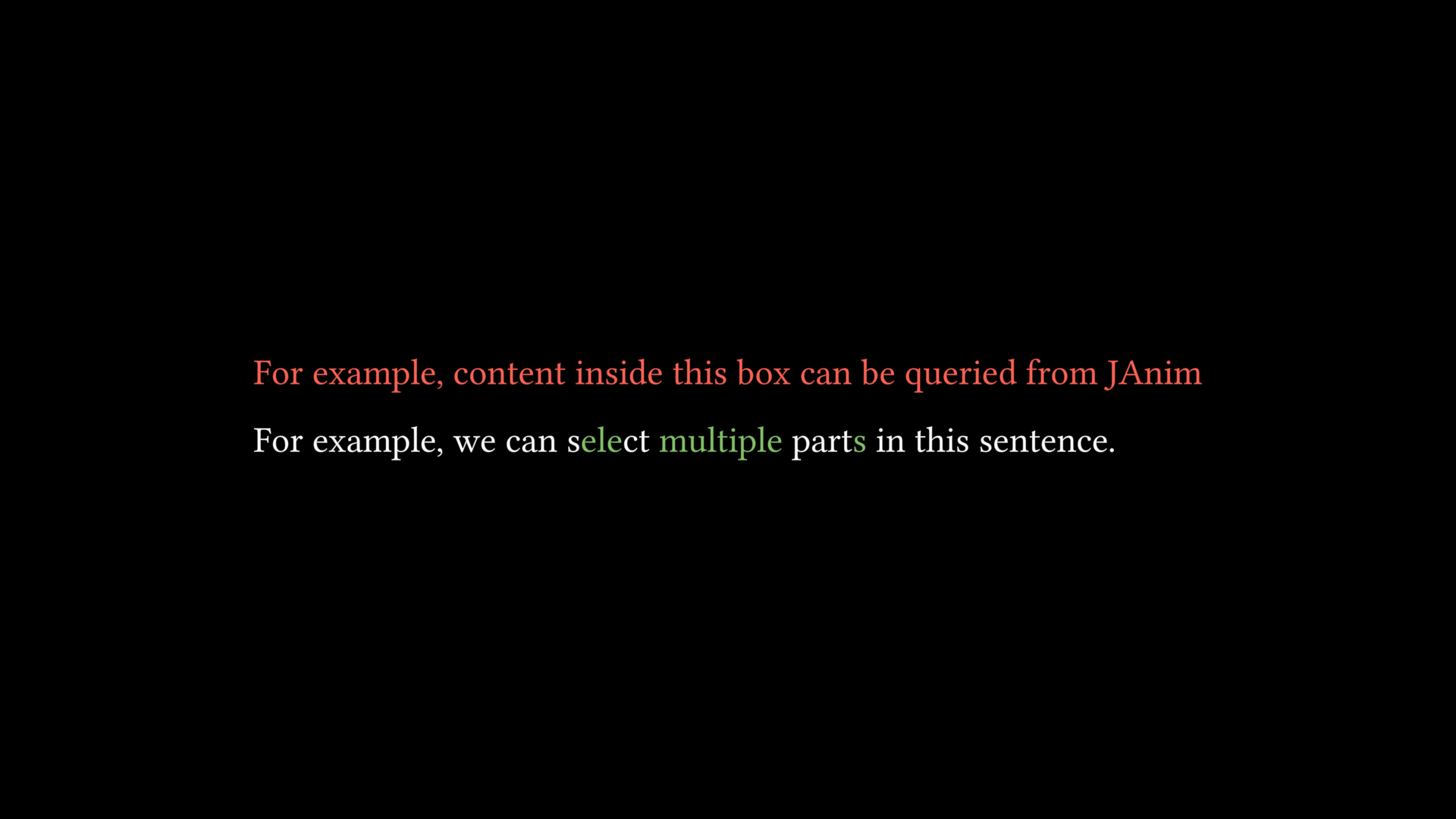
typ = TypstText(
    R'''
    #box[
        For example, content inside this box can be queried from JAnim
    ] <label1>

    #let l2(body) = [#box(body)<label2>]

    For example, we can s#l2[ele]ct #l2[multiple] part#l2[s] in this sentence.
    '''
).show()
typ.get_label('label1').set(color=RED)
typ.get_label('label2').set(color=GREEN)
Built-in Packages
JAnim provides built-in packages that can be imported in Typst using #import
#import "@janim/colors:0.0.0": *Provides color constants in JAnim (refer to Colors entry) for use in Typst
Click to expand the detailed definition of
@janim/colors// Colors #let BLUE_E = rgb("#1C758A") #let BLUE_D = rgb("#29ABCA") #let BLUE_C = rgb("#58C4DD") #let BLUE_B = rgb("#9CDCEB") #let BLUE_A = rgb("#C7E9F1") #let TEAL_E = rgb("#49A88F") #let TEAL_D = rgb("#55C1A7") #let TEAL_C = rgb("#5CD0B3") #let TEAL_B = rgb("#76DDC0") #let TEAL_A = rgb("#ACEAD7") #let GREEN_E = rgb("#699C52") #let GREEN_D = rgb("#77B05D") #let GREEN_C = rgb("#83C167") #let GREEN_B = rgb("#A6CF8C") #let GREEN_A = rgb("#C9E2AE") #let YELLOW_E = rgb("#E8C11C") #let YELLOW_D = rgb("#F4D345") #let YELLOW_C = rgb("#FFFF00") #let YELLOW_B = rgb("#FFEA94") #let YELLOW_A = rgb("#FFF1B6") #let GOLD_E = rgb("#C78D46") #let GOLD_D = rgb("#E1A158") #let GOLD_C = rgb("#F0AC5F") #let GOLD_B = rgb("#F9B775") #let GOLD_A = rgb("#F7C797") #let RED_E = rgb("#CF5044") #let RED_D = rgb("#E65A4C") #let RED_C = rgb("#FC6255") #let RED_B = rgb("#FF8080") #let RED_A = rgb("#F7A1A3") #let MAROON_E = rgb("#94424F") #let MAROON_D = rgb("#A24D61") #let MAROON_C = rgb("#C55F73") #let MAROON_B = rgb("#EC92AB") #let MAROON_A = rgb("#ECABC1") #let PURPLE_E = rgb("#644172") #let PURPLE_D = rgb("#715582") #let PURPLE_C = rgb("#9A72AC") #let PURPLE_B = rgb("#B189C6") #let PURPLE_A = rgb("#CAA3E8") #let GREY_E = rgb("#222222") #let GREY_D = rgb("#444444") #let GREY_C = rgb("#888888") #let GREY_B = rgb("#BBBBBB") #let GREY_A = rgb("#DDDDDD") #let PURE_RED = rgb("#FF0000") #let PURE_GREEN = rgb("#00FF00") #let PURE_BLUE = rgb("#0000FF") #let WHITE = rgb("#FFFFFF") #let BLACK = rgb("#000000") #let GREY_BROWN = rgb("#736357") #let DARK_BROWN = rgb("#8B4513") #let LIGHT_BROWN = rgb("#CD853F") #let PINK = rgb("#D147BD") #let LIGHT_PINK = rgb("#DC75CD") #let GREEN_SCREEN = rgb("#00FF00") #let ORANGE = rgb("#FF862F") // Be compatible with the old names #let GREEN_SCREEN = rgb("#00FF00") // Abbreviated names for the "median" colors #let BLUE = BLUE_C #let TEAL = TEAL_C #let GREEN = GREEN_C #let YELLOW = YELLOW_C #let GOLD = GOLD_C #let RED = RED_C #let MAROON = MAROON_C #let PURPLE = PURPLE_C #let GREY = GREY_C
Note
If you need to write Typst code in external .typ files outside of JAnim and want to import JAnim’s built-in packages
You need to pass the full path <site-packages>/janim/items/svg to the Typst compiler via the --package-path option or to the Tinymist plugin’s "tinymist.typstExtraArgs" option
Syntax Highlighting
As mentioned earlier, if you use the VSCode plugin janim-toolbox, it will automatically highlight Raw strings (in the form R'...') appearing in TypstDoc and TypstText with Typst syntax highlighting.
For strings that also need Typst syntax highlighting but are not in TypstDoc or TypstText, you can use the t_ function to mark them for Typst highlighting, for example
LightTyp = partial(TypstText, color=YELLOW)

typ = LightTyp(t_(R'#box(width: 10em)[#lorem(20)]')).show()
with Config(typst_shared_preamble='#set box(width: 3em, height: 3em)'):
    group = Group.from_iterable(
        TypstText(content) for content in t_(
            R'#box(stroke: red)',
            R'#box(fill: red)',
            R'#box(stroke: red, outset: 2pt)[ab]',
            R'#box(fill: aqua)[A]',
        )
    )

group.points.arrange()
group.show()
Embedding JAnim Items
Typst items support embedding JAnim items by passing the vars parameter:
typ1 = TypstText(
    R'This is a sentence with an inserted #star JAnim item',
    vars={
        'star': Star(outer_radius=0.5, color=YELLOW, fill_alpha=0.5)
    },
    vars_size_unit='em'
)

typ2 = TypstText(
    R'''
    #box(fill: luma(40%), inset: 8pt)[
        This is a grid containing JAnim items
        #grid(
            columns: 2,
            fill: luma(20%),
            gutter: 4pt,
            inset: 8pt,

            [$f(x)$\ math content],
            gif,
            star,
            [QwQ\ text content]
        )
    ]
    ''',
    vars={
        'gif': Video('Ayana.gif', loop=True).start(),
        'star': Star(),
    },
)

Group(typ1, typ2).show().points.arrange(DOWN)
self.forward(4)
Hint
When vars_size_unit is not passed, embedded JAnim items will retain their original size in JAnim. If vars_size_unit is passed, their size will be multiplied by the corresponding unit.
For example, for an item with height 1 in JAnim, if directly inserted into Typst text it will appear very large. Setting vars_size_unit='em' makes its insertion height 1em, which basically matches the text height.
vars is a dictionary. Its keys will be used as variable names in Typst code, and its values will be the corresponding JAnim items. It also supports further nesting of lists and dictionaries:
TypstText(
    ...,
    vars=dict(
        shapes=[
            Star(),
            Square(),
            Circle()
        ],
        mapping=dict(
            txt=Text('This is a JAnim sentence'),
            vid=Video('example.mp4').start()
        )
    )
)
Note
Embedding JAnim items in Typst, in principle, creates a placeholder box of corresponding size, and then after the Typst item is created, replaces it with the JAnim item to achieve embedding.
Marking Basepoint Positions
The basepoint marking feature is disabled by default. If you want to mark basepoint positions for each element of Typst items, you can enable it by passing mark_basepoint=True:
TypstText('This is a sentence', mark_basepoint=True)

typ = TypstText('Ggf', scale=4, mark_basepoint=True, fill_alpha=0.5).show()

for elem in typ:
    orig, right, up = elem.mark.get_points()
    right = orig + 4 * (right - orig)
    up = orig + 4 * (up - orig)

    Arrow(orig, right, buff=0, color=BLUE).show()
    Arrow(orig, up, buff=0, color=BLUE).show()
    Dot(orig, 0.06, fill_color=BLACK, stroke_color=BLUE, stroke_alpha=1).show()
For usage of basepoint positions, refer to BasepointVItem.
Note
mark_basepoint is actually a parameter provided by SVGItem, but since we mainly use it in Typst items, it is explained here.

Special Types of Typst Items
TypstMatrixuses Typst for matrix layoutDynamicTypstprovides a wrapper for Typst items that support dynamic parameters


Reference Documentation
JAnim class definitions: refer to typst page
Typst Chinese Community: typst-doc-cn.github.io/guide
Typst Official Documentation: typst.app/docs
Others
Typst is already integrated into JAnim as the typst-py package and does not need to be installed separately.
However, if you need to use an external Typst executable, first refer to the installation instructions in Installing Optional Dependencies, and then use one of the following methods to enable it:
For the CLI, you can pass the
--external_typstoption to enable external TypstAlternatively, in your code, you can enable it via
set_use_external_typst(True)