text
Structure of text items
The structure of text items is complex. Text contains several TextLine, and each TextLine contains several TextChar
For example, for
txt = Text('The first line.\nThe second line.\nThe third line.')
Then the following diagram illustrates its child items. txt[0], txt[1], and txt[2] are all TextLine

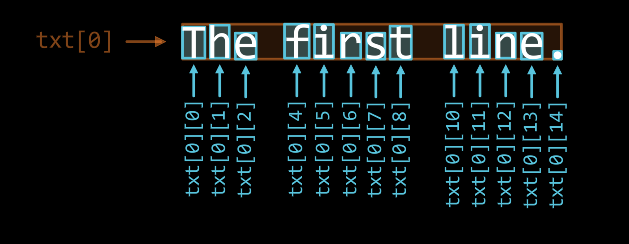
For each TextLine, such as txt[0], its child items are as shown in the following diagram
Hint
Where txt[0][3] and txt[0][9] are spaces
That is, this is a nested structure: Text → TextLine → TextChar
For such complex nested structures, if you want to slice the child items list, manually counting can be tedious (e.g., in the first line of the above example, the slice corresponding to “first” is [4:9])
To solve this problem, you can refer to the Sub-item Selector feature in the preview interface
Mark properties of characters
TextChar has four mark properties, for example, for the “g” character in “Ggf”:
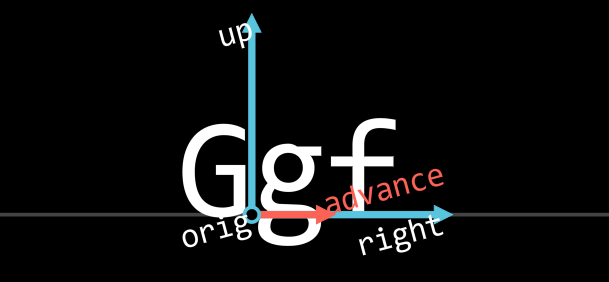
get_mark_orig()is the origin point of the character on the baselineget_mark_right()is the mark for the horizontal right direction of the characterget_mark_up()is the mark for the vertical upward direction of the characterget_mark_advance()points to theorigof the next character
Note
TextLine also has a similar structure, but only has orig, right, and up, without advance
For more information about baseline origins, refer to BasepointVItem.
Rich text
Can use start and end tags (like HTML) to apply rich text formatting:
The specific syntax is: <format_name parameters>text with applied format</format_name>
For example, to make part of the text blue, you can write:
Text('Hello <c BLUE>JAnim</c>!', format=Text.Format.RichText)
format=Text.Format.RichText can also be abbreviated as format='rich'
Text('Hello <c BLUE>JAnim</c>!', format='rich')
Note
Here c is an abbreviation for color
Important
Text requires passing format=Text.Format.RichText or format='rich' to use rich text, otherwise it is treated as plain text by default
The following lists available formats:
Name |
Abbreviation |
Effect |
Parameters |
Example |
Note |
color |
c |
Color |
Color name |
|
|
Hexadecimal value |
|
||||
r g b |
|
||||
r g b a |
|
Stroke is also set to semi-transparent |
|||
stroke_color |
sc |
Stroke color |
Same as above |
||
fill_color |
fc |
Fill color |
Same as above |
||
alpha |
a |
Opacity |
A number |
|
Stroke is also set to semi-transparent |
stroke_alpha |
sa |
Stroke opacity |
Same as above |
||
fill_alpha |
fa |
Fill opacity |
Same as above |
||
stroke |
s |
Stroke radius |
A number |
|
|
font_scale |
fs |
Scale factor |
A number |
|
Tip
If you want to input a literal < symbol without it being parsed as a rich text tag, you can use << to represent a single <. For example:
Text('if x << 10 <c RED>and</c> x > 2:', format='rich')
Reference documentation
- class janim.items.text.Cmpt_Mark_TextCharImpl(*args, **kwargs)
Bases:
Cmpt_Mark,Generic- names: list[str] = ['orig', 'right', 'up', 'advance']
- bind: Component.BindInfo | None
- class janim.items.text.Cmpt_Mark_TextLineImpl(*args, **kwargs)
Bases:
Cmpt_Mark,Generic- names: list[str] = ['orig', 'right', 'up']
- bind: Component.BindInfo | None
- class janim.items.text.ProjType(*values)
Bases:
StrEnum- Horizontal = 'horizontal'
- Vertical = 'vertial'
- H = 'h'
- V = 'v'
- class janim.items.text.BasepointVItem(*args, **kwargs)
Bases:
MarkedItem,VItem- offset_to(other: BasepointVItem, proj: ProjType | Literal['horizontal', 'vertical', 'h', 'v'] | Vect | None = None) ndarray
Calculate the offset from
selftoother. Ifprojis specified, only calculate the projection in that directionFor example, when we want to align the baseline of one text with another, we can use
.offset_to(other, 'v')to calculate the offset in the vertical direction of the baseline, and then move accordingly to align the baselines.
- matrix_of_marks() matrix
Get the matrix formed by the coordinate frame of mark points
- class janim.items.text.TextChar(char: str, fonts: list[Font], font_size: float, fill_alpha=None, **kwargs)
Bases:
BasepointVItemCharacter item, as a child item of
TextLine, created whenTextLineis created- mark
- static get_font_for_render(unicode: str, fonts: list[Font]) Font
Find a font from the font list that supports displaying
unicode, if not found, use the first one
- get_mark_orig() ndarray
- get_mark_right() ndarray
- get_mark_up() ndarray
- get_mark_advance() ndarray
- get_advance_length() float
- apply_act_list(act_params_map: dict[str, ActParamsStack]) None
Apply rich text styles, called by
Text.apply_rich_text()
- class janim.items.text.TextLine(text: str, fonts: list[Font], font_size: float, char_kwargs={}, fill_alpha=None, **kwargs)
Bases:
BasepointVItem,Group[TextChar]Single-line text item, as a child item of
Text, created whenTextis created- mark
- get_mark_orig() ndarray
- get_mark_right() ndarray
- get_mark_up() ndarray
- arrange_in_line(buff: float = 0) Self
Arrange this line according to the mark information of
advance
- class janim.items.text.Text(text: str, font: str | Iterable[str] = [], font_size: float = 24, weight: int | Weight | WeightName = 400, style: Style | StyleName = Style.Normal, force_full_name: bool = False, format: Format | Literal['plain', 'rich'] = Format.PlainText, line_kwargs: dict = {}, stroke_alpha: float = 0, fill_alpha: float = 1, stroke_background: bool = True, center: bool = True, **kwargs)
-
Text item, supports rich text and other features
If you have higher requirements for line breaks and typesetting, consider using
TypstDocandTypstTextExample:
Text('Hello World!')
Text('Hello <c RED>World</c>!', format='rich')
- is_null() bool
- idx_to_row_col(idx: int) tuple[int, int]
Get row and column indices from character index
- select_parts(pattern: str | Pattern, group: int = 0)
Get parts of the text based on
patternregular expression- Parameters:
pattern – Regular expression used for matching
group – For regular expressions, specifies which group is used for matching. The default
0means the whole matched segment; other numbers represent the corresponding groups
Tip: If you don’t want to use regular expressions, you can use
re.escapeto escape, for examplere.escape('a[i]')to correctly matcha[i]in the stringExample:
txt = Text('Hello World!')
txt.select_parts('World').set(color=RED)
This example will select the
Worldpart fromHello World!and set its color to redtxt = Text('for i in range(100) if i % 3 == 0 or i % 5 == 0') txt.select_parts(r'[^f](or)', 1).set(color=BLUE)
This example will select the
orpart and avoid selectingorinfor
- arrange_in_lines(buff: float = 0, base_buff: float = 0.85) Self
- Parameters:
buff – Extra spacing between lines
base_buff – Basic spacing between lines. The default value
0.85is used to arrange two lines vertically; if it is0, the two lines will fully overlap. In most cases, you do not need to pass this value
- match_to(target: Text | TextLine, *, self_lineno: int = 0) Self
Align this text to the target text or text line
- Parameters:
target – Target text or text line
self_lineno – Which line of itself to align to the target. Defaults to the first line (that is,
self_lineno=0)
- apply_rich_text() None
Apply rich text effects
- class janim.items.text.Title(text: str, font: str | Iterable[str] = [], font_size: float = 24, include_underline: bool = True, underline_width: float | None = None, underline_buff: float = 0.25, match_underline_width_to_text: bool = False, depth: float | None = None, **kwargs)
Bases:
GroupTitle
include_underline=Truewill add an underline (added by default)underline_widthlength of the underline (default:screen width - 2 units)match_underline_width_to_text=Truematches the underline length to the text (default isFalse)