3D Items
In the 3D Scene section, we introduced some basic concepts and knowledge about 3D space, and we learned that in 3D space, one usually needs:
An appropriate camera angle
Make items move along the
IN/OUTdirection or rotate in 3D space
For example, the example we saw in the previous section:
Geometric Structures and Surface Types
In addition to using the planar geometric items we already know to move them in 3D space, JAnim also includes several built-in spatial geometric structures and surface types
First, let us discuss spatial geometric structures. For example, spheres Sphere, tori Torus, cylinders Cylinder, and so on define the geometric information of these 3D shapes
However, this geometric information is not directly displayable as items on screen; we still need to convert it into a specific surface type of item through into(), including:
.into('checker')produces a checkerboard-style surface.into('vchecker')also produces a checkerboard-style surface, but each face is a separateVItem.into('wire')produces a wireframe-style surface.into('smooth')produces a smooth-style surface.into('dots')produces a point-cloud-style surface
Note
The difference between the 'checker' and 'vchecker' types is that the former renders a checkerboard surface as a whole, while the latter renders each face as a separate VItem. The former generally performs better, while the latter offers greater flexibility.
For example, this demonstrates several surface types for a torus:
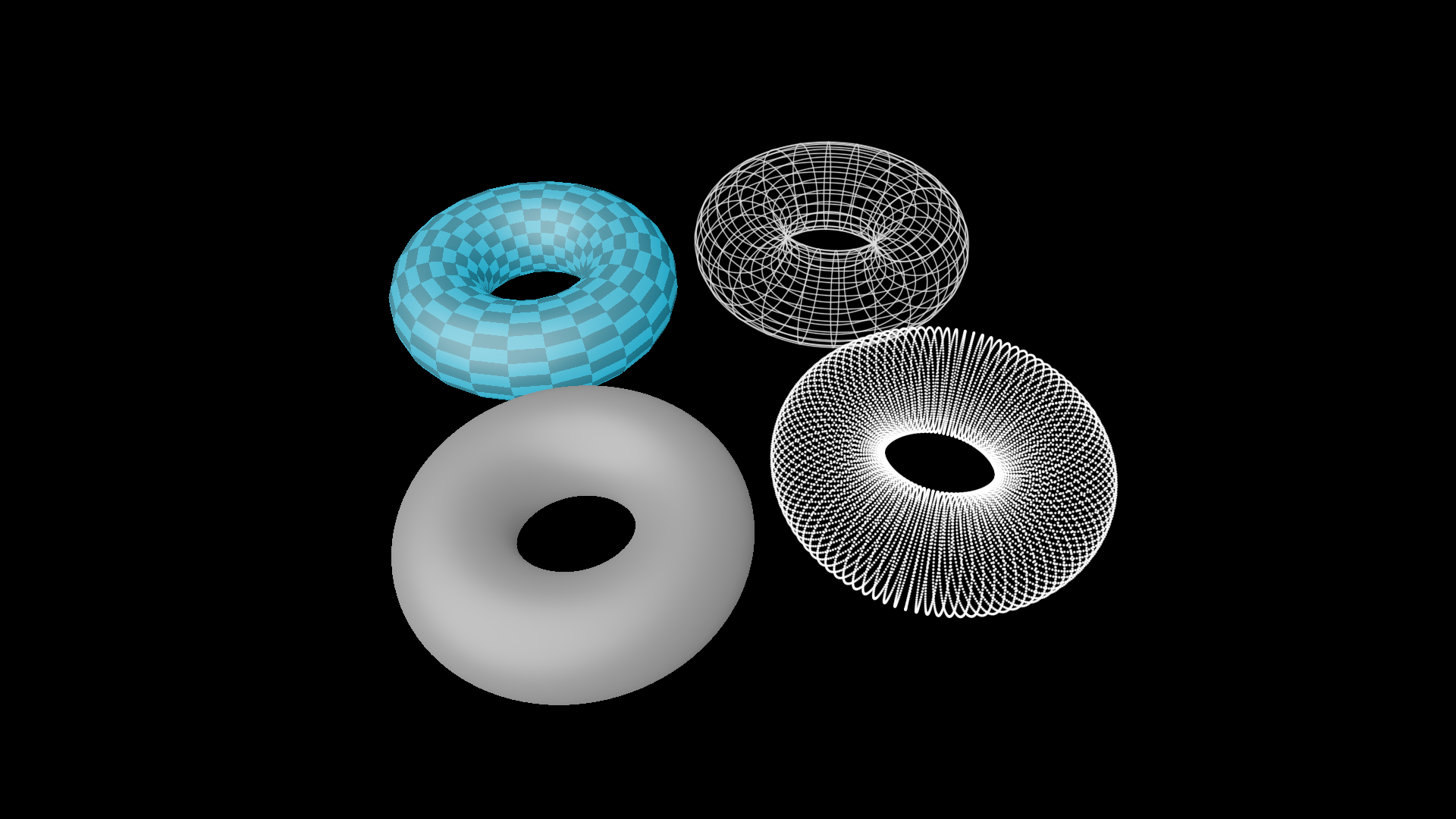
shape = Torus(1, 0.5)
torus1 = shape.into('checker')
torus2 = shape.into('wire')
torus3 = shape.into('smooth')
torus4 = shape.into('dots')

group = Group(torus1, torus2, torus3, torus4).show()
group.points.arrange_in_grid()
self.camera.points.set(orientation=quat(0.36, -0.04, -0.11, 0.93))
self.camera.points.shift([0, -0.3, -0.32])
And a more complete demonstration:
ThreeDShapesExample 
from janim.imports import *

class _ThreeDShapesExampleSub(Timeline):
    def __init__(self, shape_type: str, background_color: JAnimColor):
        super().__init__()
        self.shape_type = shape_type
        self.background_color = background_color

    def construct(self):
        if self.shape_type == 'smooth':
            axes = ThreeDAxes((-8, 8), (-8, 8), (-8, 8)).apply_depth_test()
            self.prepare(FadeIn(axes, at=1))

        background = FrameRect(fill_alpha=1, fill_color=self.background_color, stroke_alpha=0, depth=100)
        background.fix_in_frame()
        self.prepare(FadeIn(background, at=1.5, duration=3))

        for shape in [Torus(2, 1), Cylinder(2, 4), Cone(2, 4)]:
            item = shape.into(self.shape_type).show()
            self.play(self.RotatingCamera(), duration=4)
            item.hide()

    def RotatingCamera(self):
        return AnimGroup(
            DataUpdater(
                self.camera,
                lambda data, p: data.points.rotate(TAU * p.alpha, axis=RIGHT),
                rate_func=linear
            ),
            DataUpdater(
                self.camera,
                lambda data, p: data.points.rotate(TAU * p.alpha, axis=OUT),
                rate_func=linear
            ),
        )

class ThreeDShapesExample(Timeline):
    def construct(self):
        subs = [
            _ThreeDShapesExampleSub(type, color).build().to_item()
            for type, color in zip(
                ['checker', 'wire', 'smooth', 'dots'],
                ['#000022', '#000033', '#000033', '#000022']
            )
        ]
        subs[0].show()

        effects = [
            RectClip(sub, anchor=ORIGIN)
            for sub in subs
        ]
        effects[0].show().depth.set(-1)

        dirs = [UL, UR, DL, DR]

        self.forward()
        for sub, effect, dir in zip(subs, effects, dirs):
            self.show(sub, effect)
            self.prepare(
                effect.anim
                    .points.scale(0.5).to_border(dir, buff=0)
                    .r.transform.set(scale=0.5)
            )

        self.forward_to(subs[0].duration)
Custom geometric structures
Note
Documentation needs to be improved
Custom surface types
Note
Documentation needs to be improved