text
文字物件的结构
文字物件的结构比较复杂,Text 包含若干个 TextLine,每个 TextLine 包含若干个 TextChar
比如,对于
txt = Text('The first line.\nThe second line.\nThe third line.')
那么下图便说明了它的子物件情况, txt[0] 、 txt[1] 和 txt[2] 都是 TextLine
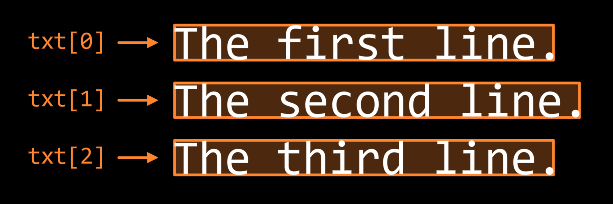
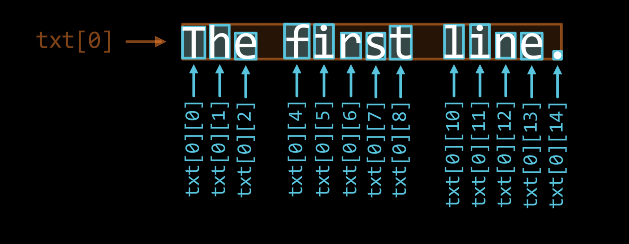
对于每个 TextLine 而言,比如 txt[0],其子物件情况是如下图这样的
提示
其中 txt[0][3] 和 txt[0][9] 是空格
也就是说这是一个 Text → TextLine → TextChar 的嵌套结构
对于这种复杂的嵌套结构,如果你想要取子物件列表的切片,手动数数可能有点繁琐(比如上面例子的首行中,"first" 对应的切片是 [4:9])
为了解决这个问题,你可以参考预览界面的 子物件选择 功能
字符的标记属性
TextChar 有四个标记属性,比如对于 “Ggf” 中的 “g” 字符而言:
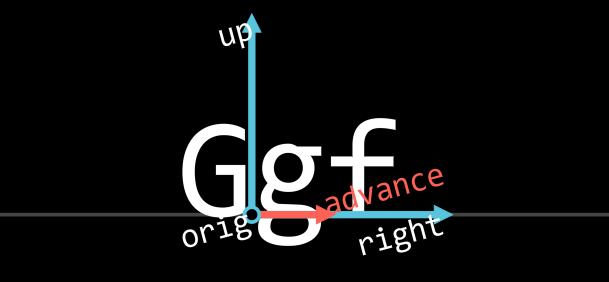
get_mark_orig()是字符在基线上的原点get_mark_right()是对字符水平右方向的标记get_mark_up()是对字符竖直上方向的标记get_mark_advance()指向下一个字符的orig
备注
TextLine 也有类似的结构,但是只有 orig 、 right 和 up,没有 advance
富文本
可以使用起始标记和结束标记(像 html 那样的)应用富文本格式:
具体写法是: <格式名 参数>被应用对应格式的文本</格式名>
比如,要想让文字的一部分变为蓝色,可以这样书写:
Text('Hello <c BLUE>JAnim</c>!', format=Text.Format.RichText)
备注
这里的 c 是 color 的简写
重要
Text 使用富文本需要传入 format=Text.Format.RichText,否则默认情况下视作普通文本
以下列出了可用的格式:
名称 |
缩写 |
作用 |
参数 |
示例 |
备注 |
color |
c |
颜色 |
颜色名称 |
|
|
十六进制值 |
|
||||
r g b |
|
||||
r g b a |
|
描边也被设置为半透明 |
|||
stroke_color |
sc |
描边颜色 |
同上 |
||
fill_color |
fc |
填充颜色 |
同上 |
||
alpha |
a |
透明度 |
一个数 |
|
描边也被设置为半透明 |
stroke_alpha |
sa |
描边透明度 |
同上 |
||
fill_alpha |
fa |
填充透明度 |
同上 |
||
stroke |
s |
描边半径 |
一个数 |
|
|
font_scale |
fs |
缩放倍数 |
一个数 |
|
参考文档
- class janim.items.text.Cmpt_Mark_TextCharImpl(*args, **kwargs)
基类:
Cmpt_Mark,Generic- names: list[str] = ['orig', 'right', 'up', 'advance']
- class janim.items.text.Cmpt_Mark_TextLineImpl(*args, **kwargs)
基类:
Cmpt_Mark,Generic- names: list[str] = ['orig', 'right', 'up']
- class janim.items.text.ProjType(*values)
基类:
StrEnum- Horizontal = 'horizontal'
- Vertical = 'vertial'
- H = 'h'
- V = 'v'
- class janim.items.text.BasepointVItem(*args, **kwargs)
基类:
MarkedItem,VItem- offset_to(other: BasepointVItem, proj: ProjType | Literal['horizontal', 'vertical', 'h', 'v'] | Vect | None = None) ndarray
- class janim.items.text.TextChar(char: str, fonts: list[Font], font_size: float, fill_alpha=None, **kwargs)
-
字符物件,作为
TextLine的子物件,在创建TextLine时产生- mark
- static get_font_for_render(unicode: str, fonts: list[Font]) Font
从字体列表中找到支持显示
unicode的字体,如果找不到只好选用第一个
- get_mark_orig() ndarray
- get_mark_right() ndarray
- get_mark_up() ndarray
- get_mark_advance() ndarray
- get_advance_length() float
- apply_act_list(act_params_map: dict[str, ActParamsStack]) None
应用富文本样式,由
Text.apply_rich_text()调用
- class janim.items.text.TextLine(text: str, fonts: list[Font], font_size: float, char_kwargs={}, fill_alpha=None, **kwargs)
基类:
BasepointVItem,Group[TextChar]单行文字物件,作为
Text的子物件,在创建Text时产生s- mark
- get_mark_orig() ndarray
- get_mark_right() ndarray
- get_mark_up() ndarray
- arrange_in_line(buff: float = 0) Self
根据
advance的标记信息排列该行
- class janim.items.text.Text(text: str, font: str | Iterable[str] = [], font_size: float = 24, weight: int | Weight | WeightName = 400, style: Style | StyleName = Style.Normal, force_full_name: bool = False, format: Format | Literal['plain', 'rich'] = Format.PlainText, line_kwargs: dict = {}, stroke_alpha: float = 0, fill_alpha: float = 1, center: bool = True, **kwargs)
-
文字物件,支持富文本等功能
如果对换行排版等有较高的需求可以考虑使用
TypstDoc- is_null() bool
- idx_to_row_col(idx: int) tuple[int, int]
由字符索引得到 行数、列数 索引
- select_parts(pattern)
根据
pattern获得文字中的部分
- arrange_in_lines(buff: float = 0, base_buff: float = 0.85) Self
buff: 每行之间的额外间距base_buff: 每行之间的基本间距,默认值0.85用于将两行上下排列,如果是0则会让两行完全重合,大部分时候不需要传入该值
- apply_rich_text() None
应用富文本效果

- class janim.items.text.Title(text: str, font: str | Iterable[str] = [], font_size: float = 24, include_underline: bool = True, underline_width: float | None = None, underline_buff: float = 0.25, match_underline_width_to_text: bool = False, depth: float | None = None, **kwargs)
基类:
Group标题
include_underline=True会添加下划线(默认添加)underline_width下划线的长度(默认屏幕宽 - 2 个单位)match_underline_width_to_text=True时将下划线的长度和文字匹配(默认为False)