三维物件
在 三维场景 这一节中我们介绍了三维空间中的一些基础概念和知识,我们知道了在三维空间中,一般来说需要:
合适的摄像机视角
让物件在
IN/OUT方向上有所移动或是在三维空间中旋转
例如上一节中我们看到的例子:
几何结构与曲面类型
除了使用那些我们先前已经知道的平面几何物件让他们在三维空间中移动,JAnim 中还内置了若干的 空间几何结构 以及 曲面类型
首先我们讨论 空间几何结构 ,举例来说,比如球体 Sphere 、圆环 Torus 、 圆柱 Cylinder 等,
他们定义了这些三维图形的几何信息
但是,这些几何信息并不是能够直接显示在画面上的物件,我们还需要通过 into() 将其转换为特定 曲面类型 的物件,包括:
.into('checker')得到棋盘格样式的曲面.into('vchecker')也是得到棋盘格样式的曲面,但是每个面都是单独的VItem.into('wire')得到线框样式的曲面.into('smooth')得到平滑样式的曲面.into('dots')得到点集样式的曲面
备注
'checker' 类型和 'vchecker' 类型的区别在于,前者是整体渲染的棋盘格表面,后者每个面都是单独的 VItem ,各有优劣:整体渲染性能更佳,而独立表面可以有更高的灵活度
比如这里演示了圆环的若干种 曲面类型 显示出来的样子:
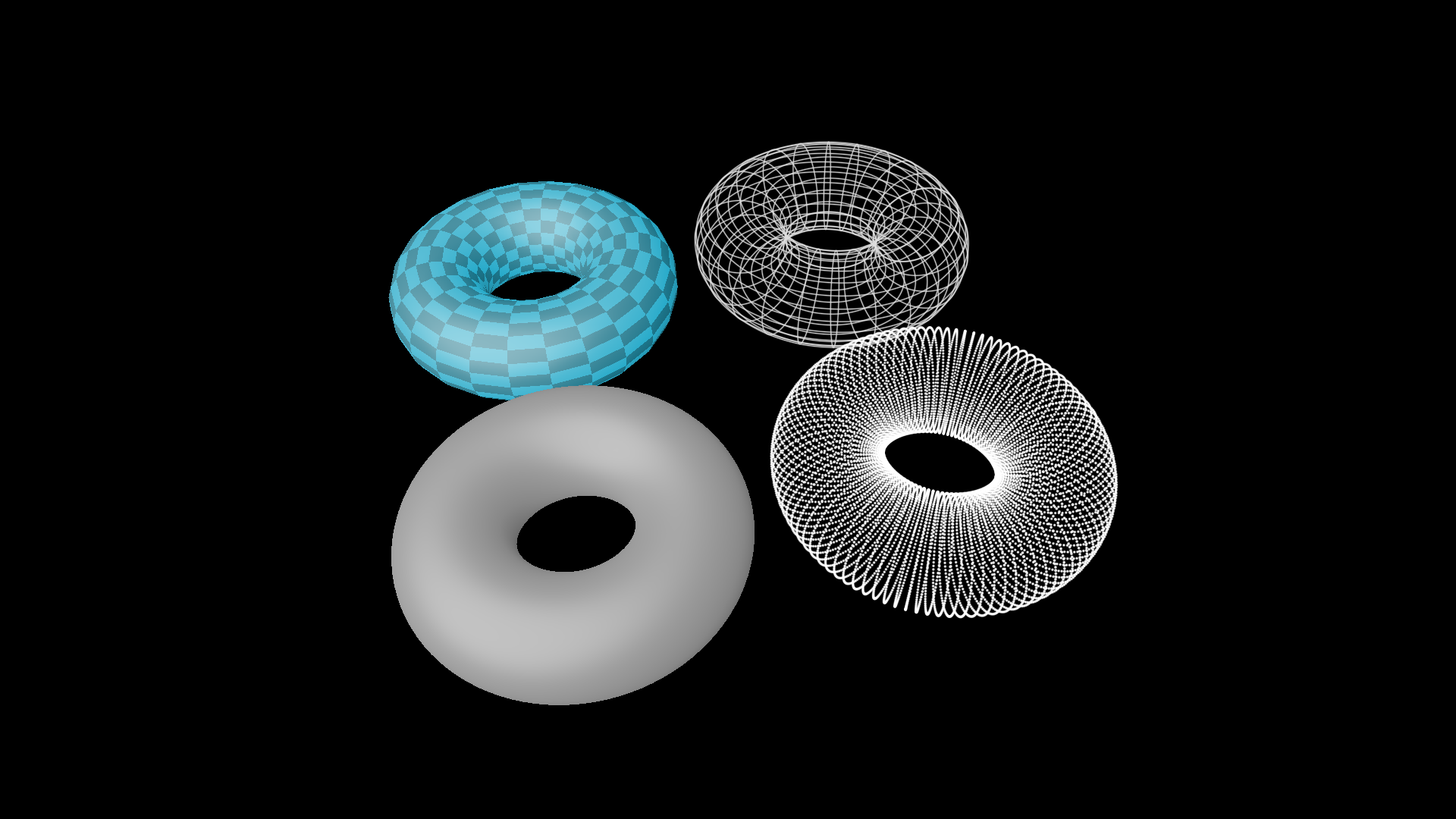
shape = Torus(1, 0.5)
torus1 = shape.into('checker')
torus2 = shape.into('wire')
torus3 = shape.into('smooth')
torus4 = shape.into('dots')

group = Group(torus1, torus2, torus3, torus4).show()
group.points.arrange_in_grid()
self.camera.points.set(orientation=quat(0.36, -0.04, -0.11, 0.93))
self.camera.points.shift([0, -0.3, -0.32])
以及一个更完整的演示:
ThreeDShapesExample 
from janim.imports import *

class _ThreeDShapesExampleSub(Timeline):
    def __init__(self, shape_type: str, background_color: JAnimColor):
        super().__init__()
        self.shape_type = shape_type
        self.background_color = background_color

    def construct(self):
        if self.shape_type == 'smooth':
            axes = ThreeDAxes((-8, 8), (-8, 8), (-8, 8)).apply_depth_test()
            self.prepare(FadeIn(axes, at=1))

        background = FrameRect(fill_alpha=1, fill_color=self.background_color, stroke_alpha=0, depth=100)
        background.fix_in_frame()
        self.prepare(FadeIn(background, at=1.5, duration=3))

        for shape in [Torus(2, 1), Cylinder(2, 4), Cone(2, 4)]:
            item = shape.into(self.shape_type).show()
            self.play(self.RotatingCamera(), duration=4)
            item.hide()

    def RotatingCamera(self):
        return AnimGroup(
            DataUpdater(
                self.camera,
                lambda data, p: data.points.rotate(TAU * p.alpha, axis=RIGHT),
                rate_func=linear
            ),
            DataUpdater(
                self.camera,
                lambda data, p: data.points.rotate(TAU * p.alpha, axis=OUT),
                rate_func=linear
            ),
        )

class ThreeDShapesExample(Timeline):
    def construct(self):
        subs = [
            _ThreeDShapesExampleSub(type, color).build().to_item()
            for type, color in zip(
                ['checker', 'wire', 'smooth', 'dots'],
                ['#000022', '#000033', '#000033', '#000022']
            )
        ]
        subs[0].show()

        effects = [
            RectClip(sub, anchor=ORIGIN)
            for sub in subs
        ]
        effects[0].show().depth.set(-1)

        dirs = [UL, UR, DL, DR]

        self.forward()
        for sub, effect, dir in zip(subs, effects, dirs):
            self.show(sub, effect)
            self.prepare(
                effect.anim
                    .points.scale(0.5).to_border(dir, buff=0)
                    .r.transform.set(scale=0.5)
            )

        self.forward_to(subs[0].duration)
自定义几何结构
备注
文档有待完善
自定义曲面类型
备注
文档有待完善